


Build the agent
Knowledge base
How crawling, embedding, and source citations work — and how to keep your agent grounded in fresh, accurate content.
How indexing works
When you connect a URL, we crawl pages discoverable from sitemap.xml and internal links, respecting robots.txt. Each page is chunked into ~500-token passages and embedded with the configured embedding model. The embedded passages live in a vector database, scoped per agent.
The Knowledge sources page
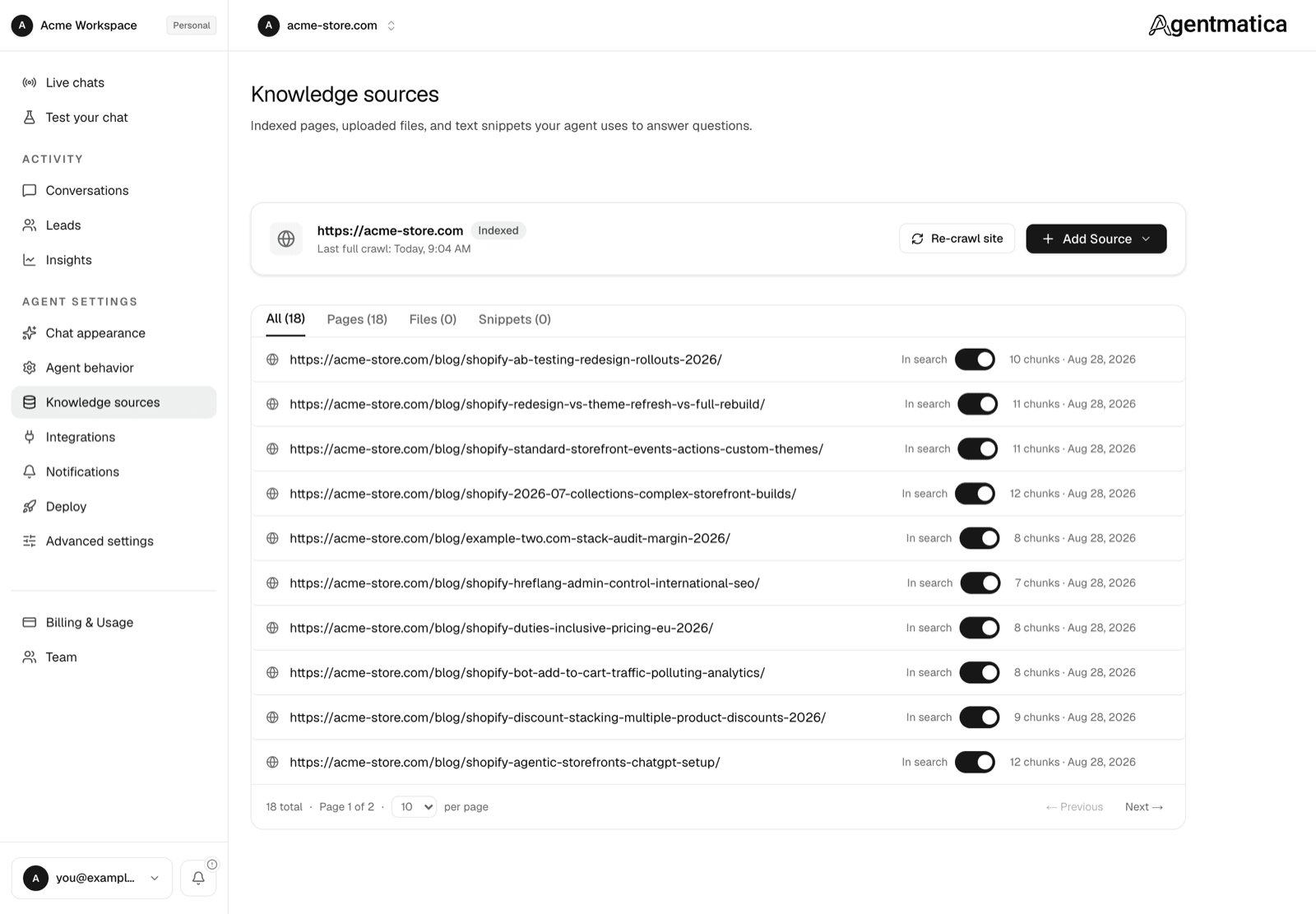
Everything indexed lives in Agent → Knowledge sources. Live data connections (Shopify, WooCommerce, WordPress, Notion, custom MCP) are set up on the separate Integrations page; what they contribute shows up here.
The bar at the top shows the connected site, when it was last crawled, and two actions:
- Re-crawl — replace the current index with a fresh crawl. The agent stays usable throughout. If a crawl fails, the reason is shown here (and sent as a Crawl failed alert) so you can fix a robots rule or a blocked host before retrying.
- Add Source — Upload Files, Add Page URL (index a single page, even on another domain, without re-crawling the site), or Add Text Snippet.
Below that, the ledger lists every source with tabs for All, Pages, Files, Snippets, and — when a store is connected — Inventory. Long lists paginate at 10 or 50 rows.
Per-page control
Every crawled page has an In search / Excluded switch. Exclude a page and it stays crawled (so links and the site map remain intact) but its passages are never used in answers. Use this for outdated blog posts, careers pages, or legal boilerplate that keeps getting cited.
Everything indexed counts against the workspace's indexed pages quota — see Billing & quotas.
Uploading files
We accept PDF, DOCX, TXT, and Markdown up to 20 MB each, plus PNG, JPEG, and WEBP images of documents. Documents are parsed in your browser before import — the raw file never leaves your machine, only the extracted text does. Images that are larger than 1600px on a side (or over 4 MB) are resized in the browser first. The chat model then reads the visible text and saves it as markdown. Parsed content is chunked and embedded exactly like crawled pages. A single source can hold up to 500,000 characters of text.
Text snippets
For content that doesn't live anywhere yet — an internal FAQ, a policy you haven't published — add a snippet with a title and paste the content. Markdown is fine. Snippets join the index immediately.
Inventory map
When a Shopify or WooCommerce store is connected, the Inventory tab builds a compact map of your catalog: product families, colors and styles, price bands, how many active SKUs there are, and cross-sell rules inferred from the data. The agent reads this map before answering sales questions so it recommends within your real range instead of guessing, and it knows what to pair with what.
Press Sync to rebuild it after a big catalog change. Large Shopify stores export in the background and the tab shows Syncing until the map lands. A sync waits while a site crawl is running.
Live site tools
During a crawl we also look for interactive controls on your site — search boxes, availability checkers, order-status lookups, quote calculators, store locators. Anything usable is proposed under Agent → Agent behavior → Live site tools with a preview. Enable a tool and the agent can drive it from inside the visitor's browser, with the visitor's own cookies and session, and report the result in chat. Nothing is enabled until you review it, and the Test your chat page cannot run these tools — test them on the live site.
Citations
Every assistant reply records which passages it pulled from. The widget shows source links inline. From the dashboard, opening a conversation transcript shows citation chips under each turn — click one to jump straight to the source URL.
What the agent does when sources are missing
The system prompt instructs the agent to say “I don't know” and offer to escalate rather than guess. If your traffic starts producing “I don't know” replies, that question shows up in Insights as a coverage gap — usually a sign your content needs a doc page.
Trained Q&A pairs
Crawled pages cover the common case, but some answers need to be exactly right — refund language, pricing edge cases, legal-adjacent replies. Open any chat transcript and use Improve answer to save a canonical Q&A pair. It joins this same vector index and the agent prefers it over crawled passages on the next match. See Improve answers.
Adding context the agent can't infer
Some context isn't indexable from a public site — internal policies, escalation rules, your tone of voice. Set these in Agent → Agent behavior: who the agent represents and how it sounds under AI Identity; refusals and hand-off rules under Boundaries; standing sales coaching under Playbook. See Persona & tone.
Site instructions in llms.txt
If your site publishes a llms.txt file, you can add a dedicated ## Agent instructions block with optional ### subsections. On each crawl we read it, together with the calls to action and booking links we find on your pages, into the Site instructions field under Agent → Agent behavior → Playbook (up to 1,000 characters). Recrawls keep it fresh until you edit the field; after that it is yours, with a Reset to crawl version button if you change your mind.
Example:
## Agent instructions

### Sales
Always mention free shipping on orders over $50.

### Escalation
Escalate billing disputes after one unresolved reply.
Site instructions sit below identity and tone in the system prompt. Boundaries and the built-in guardrails still win if there is a conflict.