


Get started
Deploy the widget
Single script tag, any site. Loads asynchronously and doesn't block render. The Deploy page also holds allowed domains, page visibility rules, and the hosted chat page.
Copy the snippet
The tag loads a tiny loader.js that fetches the real widget bundle named in data-widget-src. That lets us ship widget updates without you touching the snippet again.
Open your agent in the dashboard, go to Deploy → Install Widget, and copy the snippet (don't retype it — the src URL and agent ID are pre-filled for you). It looks like:
<script
  src="https://agentmatica.com/loader.js"
  data-widget-src="https://agentmatica.com/widget.js"
  data-bot-id="YOUR_BOT_ID"
  id="agentmatica-widget-script"
  defer
></script>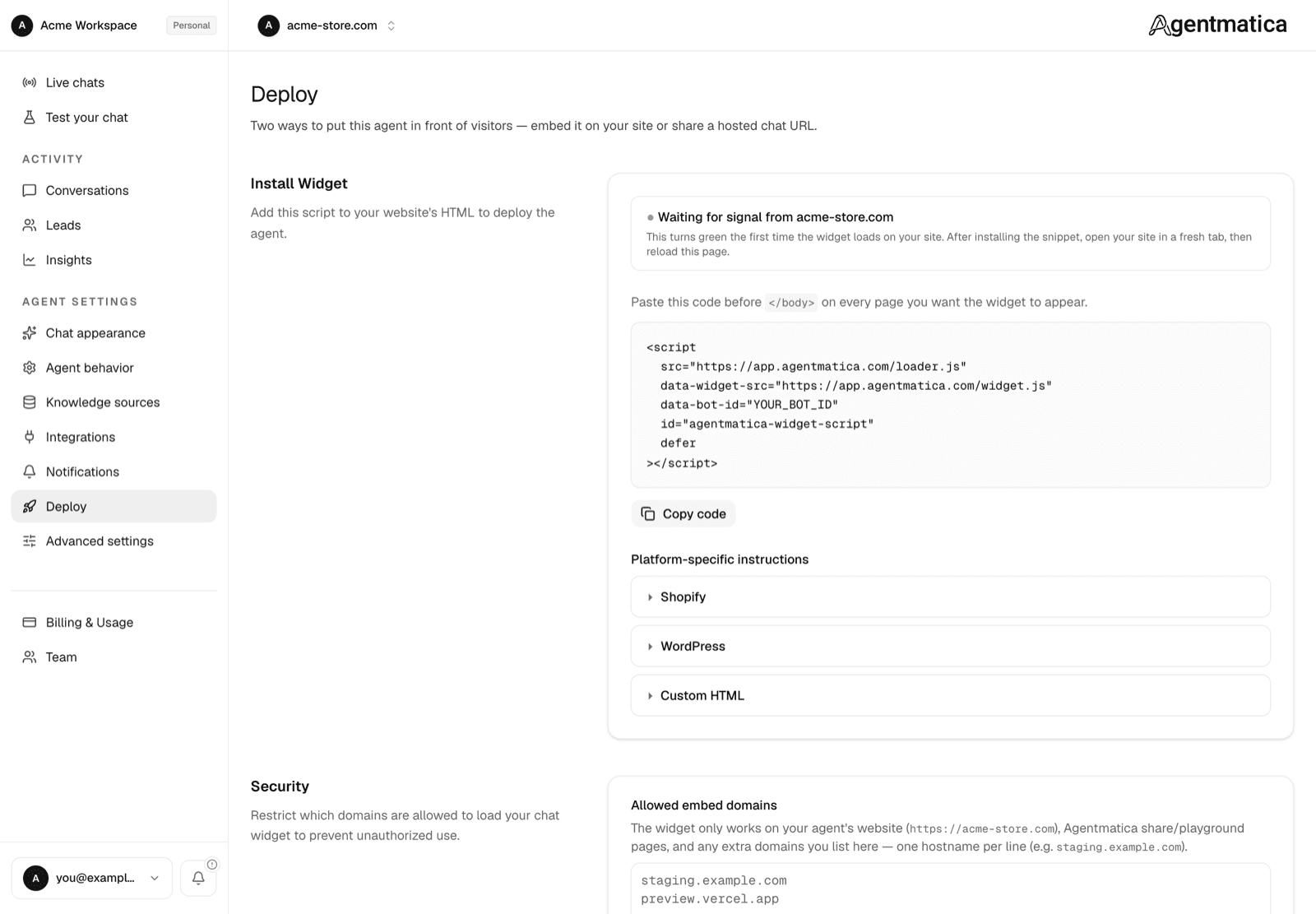
Where to paste it
Anywhere before </body>. Most teams put it in the site's root layout so it loads on every page.
Shopify
Theme editor → Edit code → theme.liquid → paste just before </body>. When Shopify is connected on the Integrations page, the Deploy page switches to the Liquid snippet automatically, so logged-in shoppers are recognized without re-entering order details:
<script
  src="https://agentmatica.com/loader.js"
  data-widget-src="https://agentmatica.com/widget.js"
  data-bot-id="YOUR_BOT_ID"
  id="agentmatica-widget-script"
  data-amk-logged-in="{% if customer %}1{% else %}0{% endif %}"
  data-amk-customer-token-url="/apps/agentmatica/customer-token"
  defer
></script>
Requires Connect Shopify (OAuth) on the agent and the Agentmatica App Proxy (see Shopify integration). Classic customer accounts only for logged-in identity.
WordPress
Use any “custom code” plugin (e.g. WPCode), or paste into your theme's footer.php. Once the Agentmatica for WordPress plugin is connected, the Deploy page shows a PHP variant instead that also identifies logged-in customers for order lookup and post-purchase support. See WordPress integration.
Next.js / React
Use next/script with strategy afterInteractive:
import Script from "next/script";

<Script
  src="https://agentmatica.com/loader.js"
  data-widget-src="https://agentmatica.com/widget.js"
  data-bot-id="YOUR_BOT_ID"
  strategy="afterInteractive"
/>
Plain HTML / static sites
Drop the snippet anywhere. The defer attribute means order doesn't matter for FCP.
Security: allowed embed domains
The Security card lists the domains the widget may run on. Your agent's website URL and Agentmatica's own share and playground pages are always allowed; add staging hosts or a second storefront here. A widget loaded from any other origin is refused a session token and stays silent — see REST API for how session tokens work.
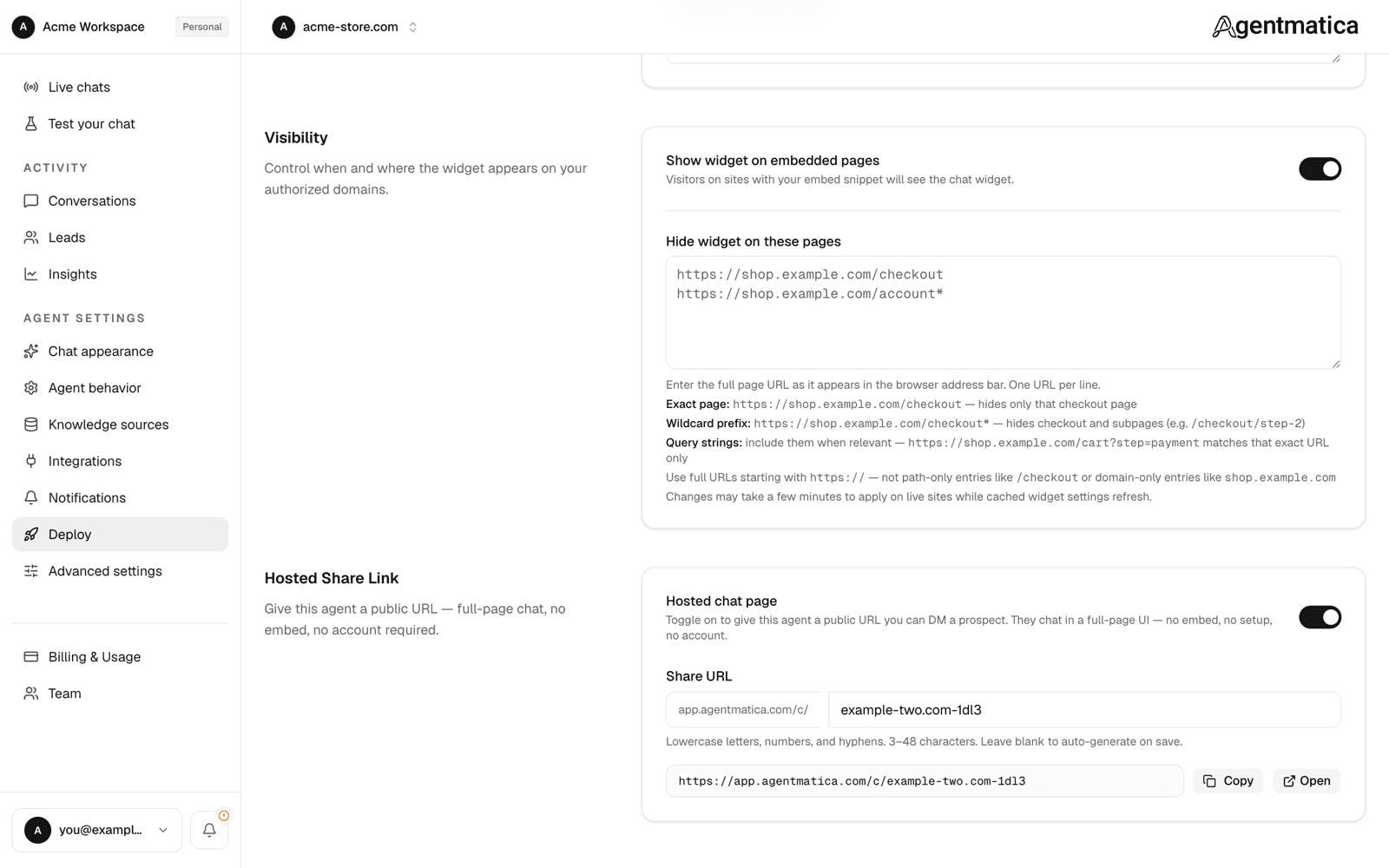
Visibility: hide the widget on some pages
The Visibility card has two controls:
- Show widget on embedded pages — the master switch. Turn it off to take the widget down everywhere without touching your site's code. The hosted chat page is unaffected.
- Excluded page URLs — one absolute URL per line. The widget stays hidden on those pages. Useful for checkout, account, or legal pages where a chat launcher gets in the way.
To have the chat open itself on checkout hesitation or a cart add, see Behavioral intercept. For inline typing prompts inside your content, see Intercept nodes.
No site yet? Use the hosted chat page
The Hosted Share Link card can give your agent a public URL — visitors chat in a full-page UI with no embed, no setup, and no account. Toggle on Hosted chat page and pick a slug (lowercase letters, numbers, and hyphens; 3–48 characters). The page always uses the Spotlight layout. Handy for DMing a prospect or testing on a phone before the widget ships.
Customizing appearance
Layout, bubble position, logo, colors, welcome copy, and suggested prompts live in Agent → Chat appearance with a live preview — see Chat appearance. Changes propagate within a minute; the widget fetches its config live, not at build time.
Verifying it works
- Open your site in an incognito window.
- You'll see the launcher in the bottom-right by default (or the Spotlight prompt, depending on display mode).
- Open it and ask any question your indexed content covers.
- Watch the new conversation appear in Agent → Conversations in the dashboard.
- The Widget status indicator on the Deploy page flips from “We haven't seen the widget yet” to confirmed once the script loads on your domain.
agentmatica.com to your script-src directive and confirm the domain under Security.