


Connect tools
Custom webhook
Send lead and escalation events from your agent to any HTTPS endpoint. Use it with Zapier, Make, n8n, or your own backend to create tickets, update a CRM, or trigger internal workflows.
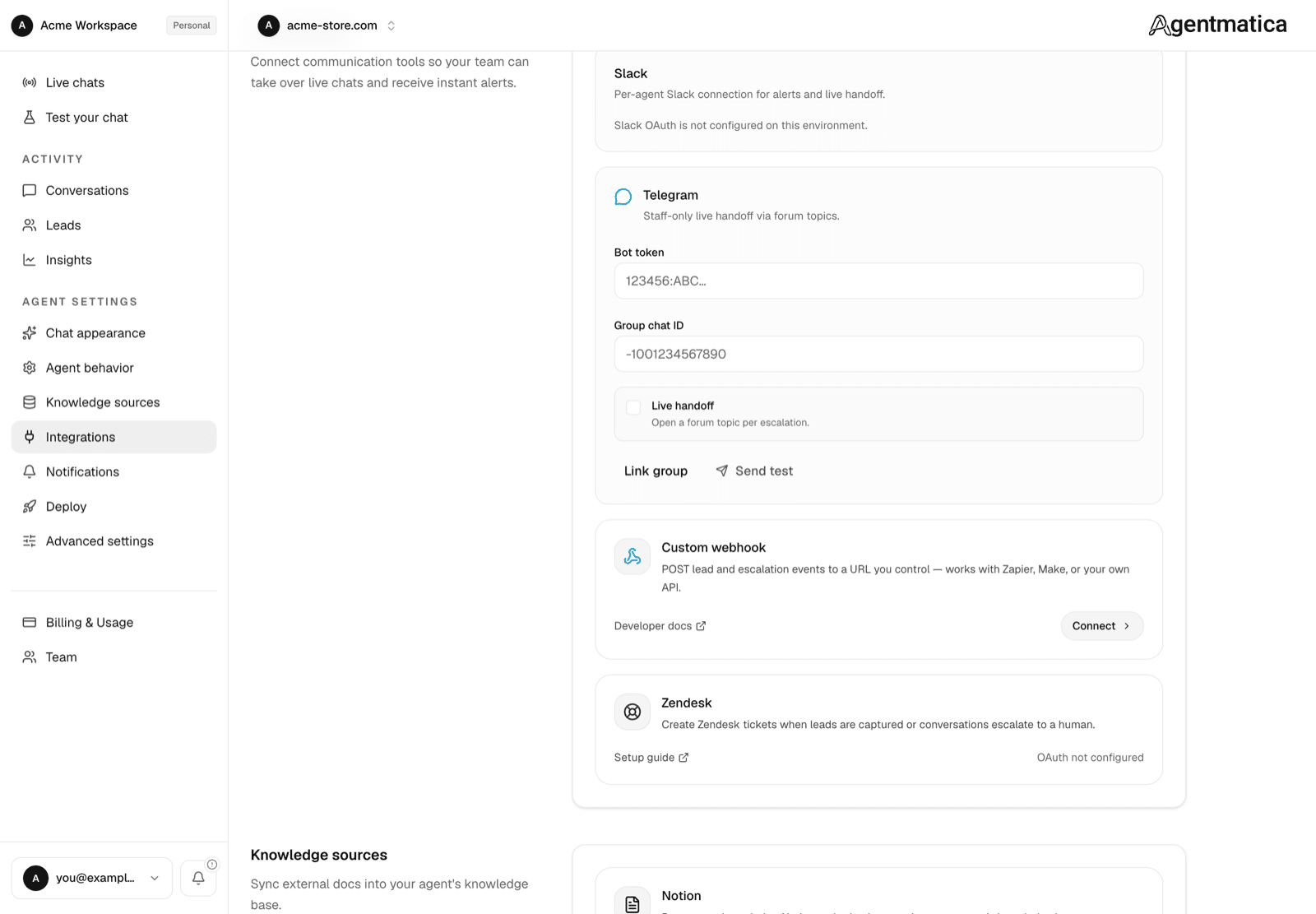
Connect a webhook
- Open your agent in the dashboard and go to Integrations.
- Under Team Handoff, click Connect on the Custom webhook card.
- Enter your endpoint URL, choose which events to send, and click Save.
- Use Test lead event or Test escalation event to verify delivery before going live.
Events
Agentmatica sends an HTTP POST with a JSON body for each event. Delivery uses a 10 second timeout; respond with any 2xx status to acknowledge receipt.
lead.captured— when a visitor submits contact details through the agentconversation.escalated— every time a chat is handed off to a human or flagged for follow-up, including when a live Slack or Telegram handoff starts
Test events from the dashboard include data.test: true. Live events omit that field.
Payload format
Every request uses this envelope:
{
  "event": "lead.captured",
  "timestamp": "2026-07-27T10:00:00.000Z",
  "bot_id": "00000000-0000-4000-8000-000000000001",
  "data": { ... }
}
lead.captured
{
  "event": "lead.captured",
  "timestamp": "2026-07-27T10:00:00.000Z",
  "bot_id": "00000000-0000-4000-8000-000000000001",
  "data": {
    "lead_id": "00000000-0000-4000-8000-000000000002",
    "conversation_id": "00000000-0000-4000-8000-000000000003",
    "name": "Jane Doe",
    "email": "jane@example.com",
    "phone": "+1 555 0100",
    "message": "Please call me about pricing.",
    "dashboard_url": "https://agentmatica.com/dashboard/bots/…/leads",
    "conversation_url": "https://agentmatica.com/dashboard/bots/…/conversations/…"
  }
}lead_id, conversation_id, name, phone, message, and conversation_url may be null when unknown.
conversation.escalated
{
  "event": "conversation.escalated",
  "timestamp": "2026-07-27T10:00:00.000Z",
  "bot_id": "00000000-0000-4000-8000-000000000001",
  "data": {
    "conversation_id": "00000000-0000-4000-8000-000000000003",
    "reason": "Visitor requested a human",
    "summary": "Needs help choosing a plan.",
    "conversation_url": "https://agentmatica.com/dashboard/bots/…/conversations/…",
    "dashboard_url": "https://agentmatica.com/dashboard/bots/…/conversations/…"
  }
}
Request headers
Content-Type: application/jsonUser-Agent: Agentmatica-Webhook/1.0X-Agentmatica-Event— same value as theeventfield (lead.capturedorconversation.escalated)X-Agentmatica-Signature— present when you configure a signing secret in the dashboard. Format:sha256=<hex digest>
Verify signatures (HMAC)
When you set a signing secret on the integration card, verify every request before processing it:
- Read the raw request body as bytes or a string — do not re-serialize parsed JSON.
- Compute
HMAC-SHA256(rawBody, signingSecret)and hex-encode the digest. - Compare to the
X-Agentmatica-Signatureheader after thesha256=prefix using a constant-time comparison. - Reject the request with
401if verification fails.
Node.js (Express)
import crypto from "node:crypto";
import express from "express";

const app = express();

// Keep raw body for signature verification.
app.post(
  "/webhooks/agentmatica",
  express.raw({ type: "application/json" }),
  (req, res) => {
    const secret = process.env.AGENTMATICA_WEBHOOK_SECRET!;
    const signature = req.header("x-agentmatica-signature") ?? "";
    const rawBody = req.body.toString("utf8");

    const expected =
      "sha256=" +
      crypto.createHmac("sha256", secret).update(rawBody).digest("hex");

    const received = Buffer.from(signature);
    const expectedBuf = Buffer.from(expected);

    if (
      received.length !== expectedBuf.length ||
      !crypto.timingSafeEqual(received, expectedBuf)
    ) {
      return res.status(401).send("Invalid signature");
    }

    const payload = JSON.parse(rawBody);
    // handle payload.event / payload.data
    res.status(200).json({ ok: true });
  },
);
Python (Flask)
import hashlib
import hmac
from flask import Flask, request, abort

app = Flask(__name__)
SECRET = "whsec_your_signing_secret"

@app.post("/webhooks/agentmatica")
def agentmatica_webhook():
    raw_body = request.get_data()
    signature = request.headers.get("X-Agentmatica-Signature", "")

    expected = "sha256=" + hmac.new(
        SECRET.encode("utf-8"),
        raw_body,
        hashlib.sha256,
    ).hexdigest()

    if not hmac.compare_digest(signature, expected):
        abort(401)

    payload = request.get_json(force=True)
    # handle payload["event"], payload["data"]
    return {"ok": True}, 200
Implementing a receiver
- Accept POST only; return 2xx quickly and process asynchronously if needed.
- Use the signing secret from the dashboard (not your API token). Store it in env vars on your server.
- Branch on
payload.eventor theX-Agentmatica-Eventheader. - Use
data.conversation_urlordata.dashboard_urlto deep-link your team into the Agentmatica dashboard. - Delivery is attempted once, with a 10-second timeout, and isn't retried. Return a 2xx quickly and do heavier work after responding. If you replay events yourself, key off
lead_idorconversation_idto avoid duplicate tickets.
Zapier, Make, and n8n
Create a webhook trigger (Zapier Catch Hook, Make Custom webhook, n8n Webhook node), paste the public HTTPS URL into Agentmatica, and map data.email, data.summary, etc. to your CRM or helpdesk. No OAuth required.
Automation platforms usually skip HMAC verification. For production backends you control, configure a signing secret and verify signatures as shown above.
Troubleshooting
- Signature mismatch: ensure you hash the exact raw body Agentmatica sent, not a pretty-printed re-encoding.
- Delivery errors in dashboard: non-2xx responses and network failures are shown on the integration card under last delivery status.
- Local development:
http://127.0.0.1URLs work when Agentmatica runs locally. Cloud-hosted receivers need a public HTTPS URL.