


Run the workspace
Billing & quotas
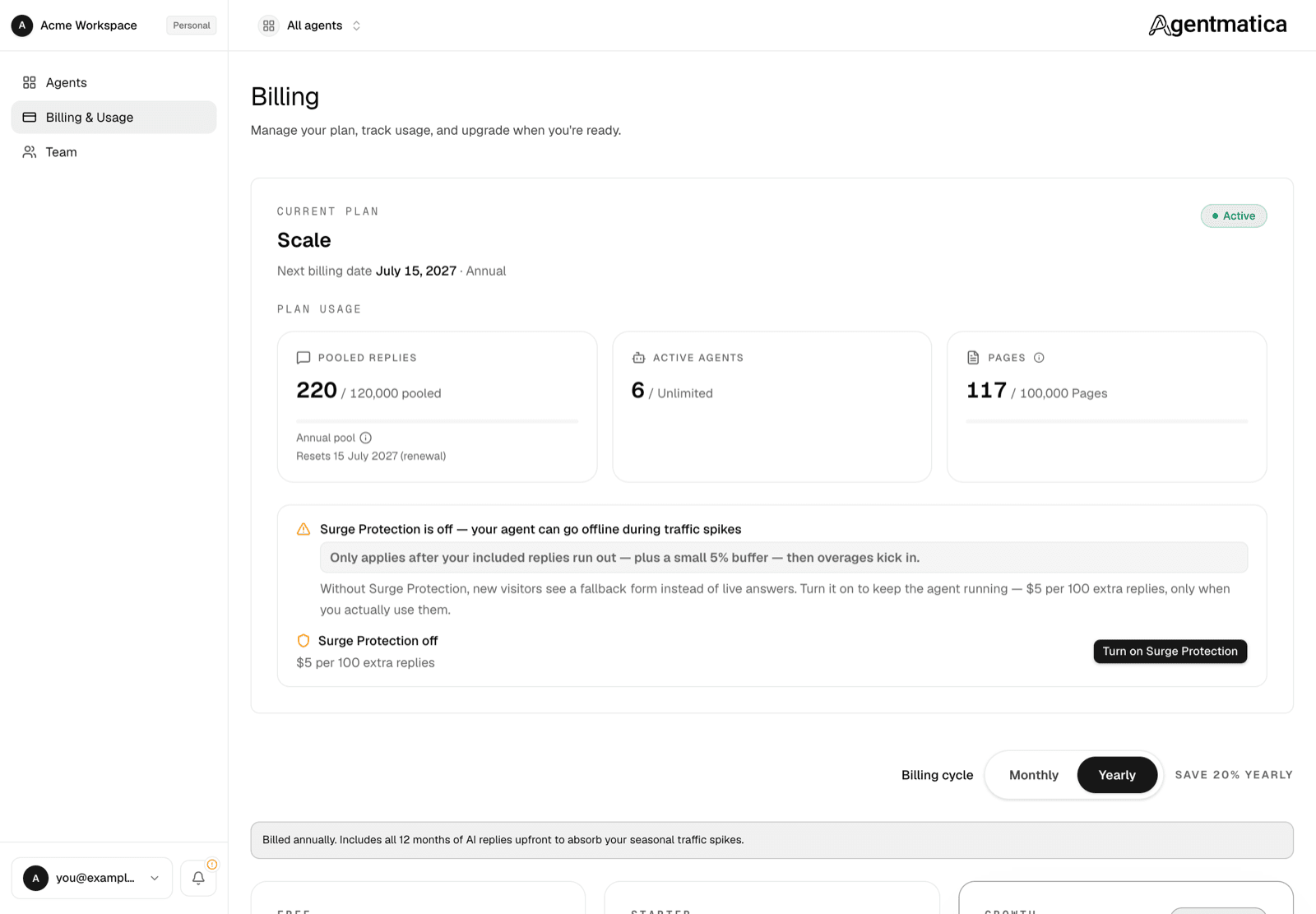
Three quotas govern your plan: replies, agents, and indexed pages. All scoped to the workspace, not per seat.
Plans
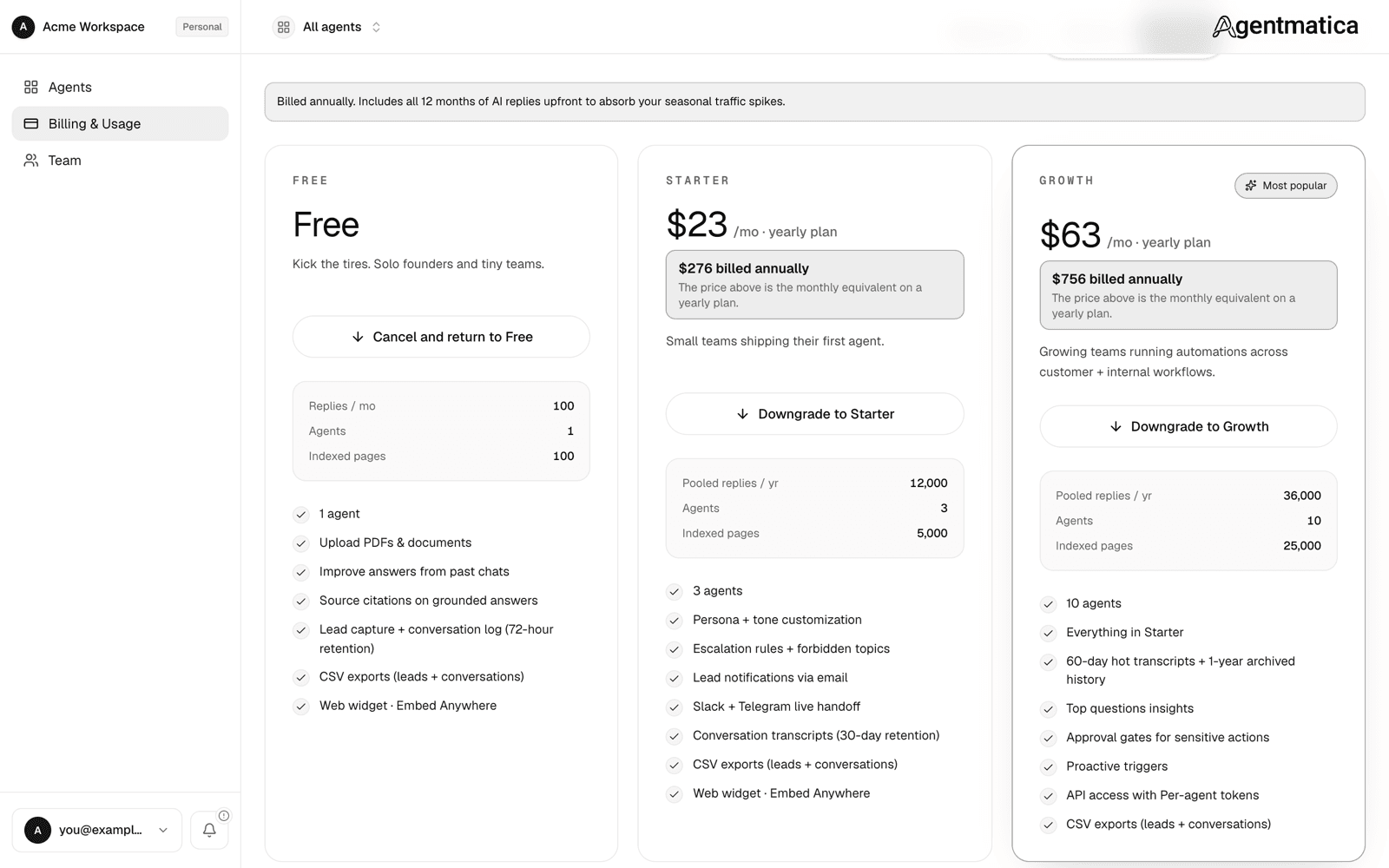
Compare on the public Pricing page. Summary (replies / agents / indexed pages per workspace):
- Free · 100 replies / month · 1 agent · 100 indexed pages · conversations and leads kept for 72 hours.
- Starter · 1,000 replies / 3 agents / 5,000 pages · 30-day retention — $29 (monthly) / $23 (annual).
- Growth · 3,000 / 10 / 25,000 · 60-day retention, one-year archive — $79 / $63.
- Scale · 10,000 / unlimited agents / 100,000 · 90-day retention, two-year archive — $199 / $159.
- Enterprise · custom volume + DPA — email hello@agentmatica.com or book a call.
Features
Every plan, Free included, gets every feature: persona & tone, guardrails, lead emails, team handoff (Slack, Telegram, webhook, Zendesk), Insights, behavioral intercept, API tokens, and custom MCP endpoints. Plans differ only in replies, agents, indexed pages, and conversation retention.
How plan limits work
Each workspace has three ceilings: replies (assistant messages per billing cycle), active agents, and indexed pages (knowledge-base capacity). Limits apply to the workspace owner's subscription and are shared across all agents in that workspace — not per team member.
Free plan. Free-tier limits follow our current product catalog and may be updated from time to time without individual notice. When limits change, they apply to all Free workspaces on the next sync (for example when you sign in or on a routine system update). We do not grandfather Free-tier ceilings.
Paid plans. When you subscribe or upgrade, your reply, agent, and page ceilings are set from the plan you purchased. Those ceilings stay in place for that subscription unless you change tiers (upgrade, downgrade, or cancel). We honor the limits that were in effect when you activated or last changed your paid plan.
Renewals. At each billing renewal we reset usage counters for the new cycle — for example reply count and overage tallies — but we do not lower or raise your stored plan ceilings. Knowledge-base usage (indexed character count) is not reset on renewal; it reflects what you have indexed until you delete sources or change plans.
Indexed pages (knowledge base)
"Pages" are a simplified label. One page = up to 4,000 characters of extracted text (~700 words). Your limit applies cumulatively across crawled URLs, single-page imports, uploaded files, text snippets, and trained Q&A pairs. If a new source would exceed your remaining balance, ingestion is blocked with a quota error.
What counts as a reply
One assistant message = one reply. Tool calls, intermediate reasoning, and retrievals don't count — only the final answer the visitor sees. Replies on the Test your chat page count.
What happens when you hit a quota
- Replies — included replies come with a small 5% buffer. Past that, behaviour depends on Surge Protection (below). With it off, chat returns
403 Quota exceededand the widget shows a fallback contact form instead of live answers until the next cycle or an upgrade. - Indexed pages — adding sources (crawl, single-page URL, file upload, or text snippet) returns
403when your character balance is full. Existing indexed content stays available; remove sources or upgrade to add more. - Agents — after a downgrade, the oldest agents up to the new limit stay active and the rest are suspended: they stop serving visitors but nothing is deleted, and a banner offers the upgrade that reactivates them.
Surge Protection (overage)
Paid plans can switch on Surge Protection from the Billing page. When your included replies run out, the agent keeps answering and extra replies are billed at $5 per 100 extra replies, only for what you actually use. Overage spend in a cycle is capped at your plan's monthly price, so a traffic spike can never more than double a bill.
Usage warnings
The workspace owner gets an email and a push notification as reply usage climbs: at 80% and 95% with Surge Protection off, or a single heads-up at 85% with it on. One notification per threshold per cycle.
Upgrading
Open Billing & Usage from the sidebar. Click Upgrade to X for your tier of choice — we redirect to DodoPayments checkout. After payment, your plan activates within a minute and the Billing page confirms it.
Signed up from the Shopify app? Then your plan is billed through Shopify. Plan changes still start on Billing & Usage, which opens Shopify's plan page in your store admin, and charges appear on your Shopify invoice. See Shopify.
Changing plans
Once you're on a paid plan, pick any other tier or interval on the Billing page. A dialog previews the prorated charge or credit before you confirm.
- Upgrades apply immediately; you pay the prorated difference for the rest of the cycle.
- Downgrades (and switching yearly → monthly) are scheduled for the end of the current period. The page shows “Downgrading to X on <date>” with a Keep <current plan> button in case you change your mind.
Open billing portal takes you to DodoPayments to update the payment method or download invoices. If the dashboard ever disagrees with what you were charged, Sync with Payment Provider pulls the latest state.
Cancelling
Cancel subscription stops auto-renewal. You keep paid access until the end of the current period (the page shows the date and a Cancelling status), then the workspace returns to the Free plan with then-current Free limits. Until that date a Resume subscription button undoes the cancellation. No partial refunds unless required by law.